
Microsoft Copilot Cowork: What is it and How Can Businesses Use it ?
There’s a big difference between asking AI how to do something and asking AI to actually do the work.
That’s what makes Microsoft Copilot Cowork interesting.
Copilot Chat is great for summarizing, drafting, brainstorming, and answering questions. Copilot Cowork goes further. You give it an outcome, and it can work through multiple steps across Microsoft 365 to help complete the job.
For business leaders, that changes the question from, “What can AI write for me?” to something much more useful:
What work can I hand off?
Where can I find Microsoft Copilot Cowork?
Microsoft Copilot Cowork is an agentic AI experience designed to handle multi-step work across Microsoft 365.
Located at microsoft365.com, right now* Copilot Cowork looks a lot like Copilot Chat. Copilot Cowork is not a separate app that you have to download like Claude Cowork. Instead, Copilot Cowork is just a toggle flip away from Copilot Chat.
(*We say “right now” because AI features and interfaces are changing all the time without any heads up.)
Copilot Chat:
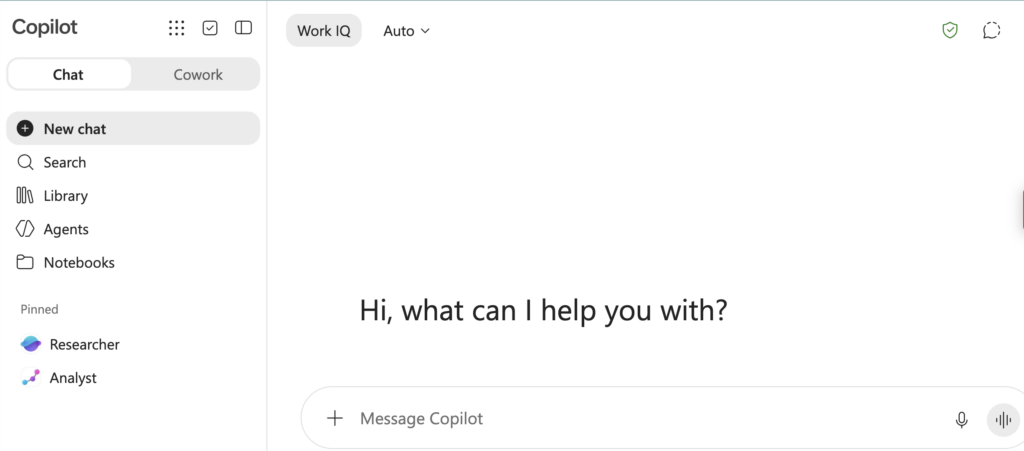
Copilot Cowork:

How is Microsoft Copilot Cowork different from Copilot Chat?
Instead of only generating answers in Copilot Chat, Copilot Cowork can work across tools like Outlook, Teams, calendars, OneDrive, SharePoint, and Microsoft 365 documents to help complete a task.
Think of the difference this way:
Copilot Chat might help you write an email.
Copilot Cowork can potentially review the situation, gather the related information, draft the email, organize supporting files, propose next steps, and help carry out the work.
That makes Cowork feel less like a chatbot and more like an assistant.
How Does Microsoft Copilot Cowork Work?
Cowork can use the context already available inside your Microsoft 365 environment.
That includes information from emails, meetings, Teams conversations, files, calendars, and other work content your account is authorized to access.
This matters because one of the biggest annoyances with AI is gathering all the context first.
You know the information exists somewhere, but you still have to find the email, locate the document, upload the spreadsheet, explain the project, and tell AI what happened last week.
Cowork can reduce some of that setup because it can work across the Microsoft 365 environment where your business information already lives.
What Can Copilot Cowork Do?
Some of the best use cases are not flashy. They’re simply the tasks that quietly eat up your day. To demonstrate it’s ability to take on time consuming, multi-step tasks, Cowork has a few pre-packaged prompts for you to push and witness the results:
1. Organize Your Inbox
Cowork can review emails, identify patterns, help organize messages, and surface what needs attention.
For example, a salesperson might receive hundreds of automated replies, newsletters, out-of-office notices, and prospect responses. Cowork can help sort through that noise and recommend ways to organize it.
The goal isn’t just a cleaner inbox.
It’s spending less time digging for what matters.
2. Prepare You for Meetings
You can ask Cowork to help prepare for an upcoming meeting.
Instead of manually searching through emails, previous conversations, files, and notes, Cowork can gather the relevant context and help produce a briefing.
That can include recent conversations, open decisions, important documents, and suggested agenda items.
If you’ve ever joined a meeting thinking, “Remind me where we left off,” this is a strong use case.
3. Protect Time on Your Calendar
Cowork can also help review your schedule and identify ways to protect time for important work.
You might ask:
“Find four hours next week for me to work on quarterly planning without creating major conflicts.”
That is much more useful than simply asking AI to describe time-management strategies.
Can Cowork Handle Complex, Multi-Step Projects?
This is where Cowork becomes especially powerful.
Giving it a project involving multiple marketing deliverables, then asking it to reproduce all of those marketing materials for a new campaign with a different subject matter resulted in Cowork flexing its muscle and getting right down to business.
It reviews reference materials, updats campaign copy, modifies documents, works on presentation content, organizes files, and produces a summary explaining what is complete and what still needs human input.
It can even catch conflicting information such as two conflicting dates being shared via email vs. a Teams chat discussion.
This is the kind of AI action that starts to feel like an actual assistant.
Can Copilot Cowork Automate Repetitive Work?
Cowork can also help with recurring tasks.
Imagine receiving event registration emails throughout the day. Instead of manually checking each one and sending an update to a coworker, Cowork could monitor the process, update the count, and send a Teams message.
That may not sound revolutionary.
But multiply small automations like that across dozens of employees, and the time savings can add up quickly. Especially when you recognize that you’re way to busy to drop what you’re doing and take action to notify colleagues each time you hear that, “You’ve got mail.” chime
So, What’s the Real Difference Between Copilot Cowork vs. Copilot Chat?
The simplest distinction is:
Copilot Chat helps you think and create. Copilot Cowork helps you execute.
Use Chat when you want to summarize, brainstorm, rewrite, research, or analyze.
Look at Cowork when your request sounds more like:
“Organize this.”
“Prepare everything I need.”
“Monitor this.”
“Update these files.”
“Get me ready for this meeting.”
“Handle this process.”
Is Copilot Cowork Safe for Business?
Cowork works within Microsoft 365 permissions, but that does not mean businesses should roll it out without a plan.
Before expanding access, review your Microsoft 365 permissions, SharePoint access, identity controls, AI policies, employee training, and approval processes.
A powerful AI tool does not fix bad permissions.
It makes good permissions even more important.
It’s a Copilot, Not an Autopilot
This may be the most important thing to understand.
Cowork can get a surprising amount of work done, but humans still need to review the output, make decisions, and own the result.
That’s not a weakness.
Cowork is not a 100% get it done solution. But, even if Cowork gets an employee 60% or 70% of the way through a tedious project in a fraction of the time, that’s a major productivity win.
Your best people probably have better things to do than hunt through email, rearrange calendars, update repetitive documents, and move information from one application to another.
Technology should solve problems, not create them.
How Can Your Teams Get Started with Copilot Cowork?
It’s Copilot, not auto-pilot. It takes strategic thought and focus to execute an effective AI adoption plan. If you want to figure out where Microsoft Copilot Cowork can safely save time in your business and what it would take to securely adopt this technology, schedule a call with Snap Tech IT. We’ll help you identify practical use cases, review your Microsoft 365 environment, and build an AI strategy that creates value without losing control of security, governance, or cost
For more Copilot Cowork insights, watch our full webinar:

Nathan Caldwell
Marketing, Snap Tech IT